Quality checks
Before your newsletter goes out, tinysend can automatically check it for problems — broken links, spelling mistakes, grammar issues, compliance. Results show up in the preview email and on the post page so you can fix things before hitting send.
Quality checks are an automation — new lists get one enabled automatically.
What gets checked
- links — verifies every URL in your email actually works (catches 404s, DNS failures, timeouts)
- spelling — finds misspelled words using AI
- grammar — finds grammar issues using AI
- proofreading — catches broken formatting, repeated words, placeholder text left in
- compliance — checks CAN-SPAM basics like unsubscribe links and deceptive subject lines
How it works
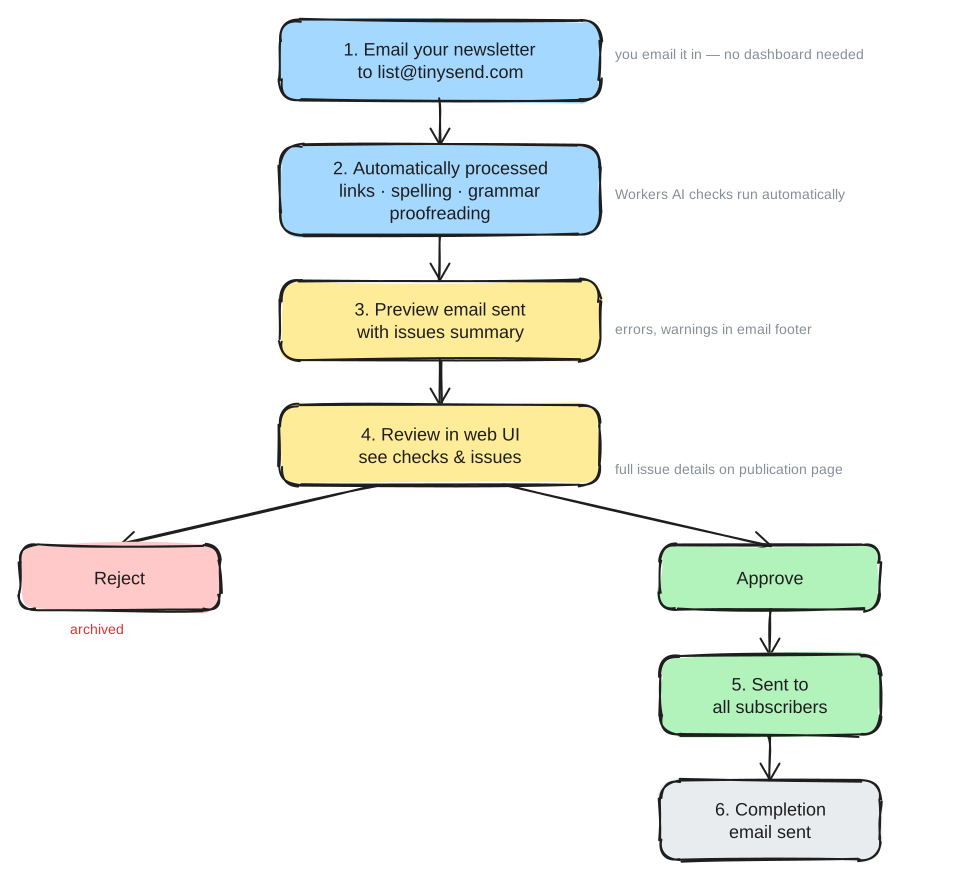
- You email your newsletter to yourlist@tinysend.com
- tinysend runs the quality check automation on the draft
- You get a preview email with a summary — “2 warnings found” or “no issues found”
- Click the review link to see full details on the post page
- Each issue shows severity (error, warning, info), what’s wrong, and a suggestion
- You decide — nothing blocks sending, you’re always in control
Severity levels
- error — something that will visibly break for subscribers (broken link, 404)
- warning — something subscribers will notice (typo, grammar issue, server timeout)
- info — style suggestions and minor improvements
Enabling and configuring
Go to your list’s Automations tab. The quality check is enabled by default on new lists — you can disable it, re-enable it, or open its configure page.
On the configure page you can add custom instructions to tailor the checks to your voice. For example: “ignore sentence fragments”, “we use British English”, “don’t flag technical jargon”.
Link checking details
tinysend extracts every URL from your email and checks each one:
- tries HEAD first, falls back to GET if the server doesn’t support HEAD
- follows redirects and records the final URL
- caches results so the same link doesn’t get re-checked within 24 hours
- a 403 is flagged as a warning (some sites block automated checks but work fine in browsers)
Completion notification
After all subscribers have received your newsletter, tinysend emails you a summary with the number delivered and failed, plus a link to the stats page.
Questions?
Contact us at hi@tinysend.com.